Tag Archives: google gemini

Photo Mosaics with SciKit, AWS, and KDTree

I’m not sure why, but a few weeks ago I got the bug to make photo mosaics. They’re quite fun. I planned out the simple infrastructure on a commute home from work. I found a repo that got me started. Then, my friend Google Gemini and I started to make changes. Why didn’t I write improvements? Because we need to see the results first.

Infrastructure, Tiles, and Starter Code

I created my own repo here. It is a fork for codebox/mosaic, a public Python repo. (Credit to (codebox, MrEbbinghuas, and Hatns for the great project.) I forked the repo, and added some quality of life tools, such as scripts to handle uploading, the splicing of videos to photos, and then photos to mosaic tiles etc.

The infrastructure was basic. I ran the code on an AWS Ec2 instance, originally a c7a.2xLarge (8 cpus, 32gb of memory), but later had to upgrade to a r7a.2xLarge (8 cpus, 64gb of memory) because OOM process kills. I also went richie-rich with an io2 drive, and provisioned over 30k iops. I regret nothing. No other infrastructure was required.

To generate tiles, I gathered videos from the Library of Congress, NASA, and public domain films. I added videos from my personal iPhone. The script, splicer.py, sampled the videos at 1 frame per second, and each frame became two different square tiles. This produced about 190k tiles. For context, there are about 170k frames in an average-length feature film.

Photos to Start

What will my mosaics look like, and how long will it take? Here are three start photos. All photos were resized to 600px on the largest side before any processing.

Aurora Luna Wynterstarr, from the DnD 5e Campaign “Strixhaven: a Curriclum of Choas”
My Cousin Ariel’s adorable Cat
Owl Coffee Mug with Latte!

Results of Original Code

The original code from codebox/mosaic produced the following images. Each photo took about 14 minutes to complete. The total processing time was 1 hour and 13 minutes. I processed a total of five photos, but the others aren’t great for the blog.

These photos came off incredibly crisp, smooth, and a bit pixelated/clumpy. We can see up close that in many cases, the same image is used over and over.

Additionally the original code, scans all 190k possible tiles when comparing it a portion of the original. Is there a way to get a prune the mosaic tiles down tile-to-be-replaced of the original photo?

Add KD Tree and SSIM

I significantly reorganized the code. I asked my friend Google Gemini if there would be a way to organize the tiles by average pixel color into buckets. From there, you could take the average color of the tile to be replaced against a smaller set of tiles, rather than all 190k. I asked it if there was something better than a Python dictionary for such a large amount of data to do it.

The suggestion was Scipy’s KDTree it indexes the mosaic tiles using their average color. Then, I can query it for a list of mosaic tiles that are k distance from that average. It does so in three dimensions (RGB), which I suppose why it is call a query_ball_tree.

The original code relied on a highly procedural method in the TileFitter class to compare the similarity between the tile-to-be-replaced and each of the 190k mosaic tiles. I replaced this with TillFitterSciKit, which used a tool from scikit-image to discover similarity.

The Structural Similarity Image Model (SSIM) returns a value between 0.0 and 1.0, which 1.0 being a perfect math. In these experiments, the average of the best tile found was about 0.43

Both the original code and my fork required mosaic tiles to be processed before matching. In my fork, I process the mosaic tiles once, and then store the results in a cached .gz file on the hard drive to speed things along.

My hope was a faster processing time at minimal expense in quality.

Results with KDTree

We did much better with time on these images. The tile caching process took about 5 minutes. The images took about 90 seconds each to complete. The entire process took about fifteen minutes for five images, the caching process included.

But how do they look?

Aurora has freckles now?
Cat has some green?

Mosaic tiles are clumpy. Less clumpy. But still clumpy.

So did things improve? I’m not sure because that is an aesthetic judgment. Things got faster, but also odd. The KDtree refines the search per tile-to-be-replaced with k mosaic tiles whose average color is the k closest or matches its average color. Wouldn’t we expect the best match out of 190k to also be within k distance from the average color of the original frame? That doesn’t appear to be the case though. More on that later.

Reducing Repetition

I did come up with a way to reduce the repetition of images. Remember that the match is float between 0.0 and 1.0, with 1.0 being a prefect match.

I added code that did this. All mosaic tiles start with a penalty of 0.0. When a mosaic is evaluated, subtract its current penalty from its actual SSIM score. When a mosaic tile is declared the best match, add a small value to its penalty (e.g. 0.03).

This means each time a tile is declared a ‘best match’, it has a higher threshold to be the ‘best match’ when it is evaluated again. The higher the value, the messier the mosaics looked.

E.g. here are some mosaics run with .05

And here are the results with a penalty of .15

Which looks right? That again is up to anyone’s visual taste. But we know for sure which ones are less clumpy and pixelated looking.

So why didn’t the KDTree pruning work?

To reiterate, the KDTree organizes mosaic tiles by average color. When we compare mosaic tiles to tiles-to-be-replaced, we take the average color of the later. We then grab mosaic tiles that are k distance from that. It is intuitive to expect the best match of tile-to-be-replaced to be close or exact in average color. This whole process is to speed up the matching work (accomplished) with minimal degradation in quality (not so much accomplished).

Put simply, why do things look like a better match in the codebox/mosaic code, than the code that used the KDTree? Here are few possibilities (and I genuinely do not know the answer).

First, “average color” might not be the right metric to organize frames by. A cloudy grey sky over an ocean might produce the same “average color” as a black and white flag with a thin turquoise line in in the middle. Aurora Lune Wynterstarr’s new freckles suggest this might be the case.

Secondly, the way I get “average color” is rather crude, simple, and the first thing my buddy Gemini told me to try. In their defense, they didn’t suggest some other methods. Maybe it’s time to find a better average.

Third, the method of grabbing the average is good, but the k distance is not high enough. It might be the case that I have many near-perfect matches of an average color, but the code excludes what SSIM would rate the best match. I find this unlikely, but not impossible.

Finally, the scikit-image SSIM might not be the right method of comparison, or it needs to be tweaked. It’s entirely possibly that this SSIM produces a lower quality result than the plodding, procedural, comparison of the original code.

I won’t know the answer to these until I experiment more, and as the experimenting runs up my AWS charges, I doubt I’ll visit it again anytime soon.

Until then, I’m happy with the state of my mosaic project.
A Candid experiment with AI engineering

AI will make you 10x faster. That is the promise I have heard. I’ve also heard that AI will turn non-technical people into technical people. Or more accurately, lower the bar for app development.

But the most important thing I know about AI (and this thought is by no means original to me!) is that you can’t know what AI can do, until you work with it.

Consequently, I embarked on a new project with the expectation to be 10x faster. This project is my public repository, and I’ll write how many hours it took later in this blog.

The Project

The project is a machine learning related web application. A user will click through a series of randomly chosen fantasy character portraits (thank you, Nexus Mods!) and label their binary gender (this is about KISS principle, not about erasure of the non binary genders!). Then, with scikit-learn, we’ll train a model on the collection of images and gender, and see how it goes.

For deployment, this will use AWS and deploy through Github. Resources used will be Fargate, s3, lambdas, an autoscaler, a load balancer, an RDS database, etc. Terraform will be used for Infrastructure as code.

I picked this project because it combines tech I know extremely well (Python, AWS, SQL), tech am I recently comfortable with (terraform), and tech that I am far from an expert in (Docker, Machine Learning, nginx)

What AI services Are to Be used?

I thought I’d check out v0 by Vercel, Cursor, and Google’s Gemini for this project. None of these are paid versions. I also did not rely on them for the same tasks or equally. Anything I say about their merits is therefore limited.

How were these services used? I started with Google Gemini and described the machine learning problem I wanted to solve. My question was intentionally broad, “How can I go through hundreds of images, and label them according to a category (e.g. ‘dog’ or ‘cat’)? I want to use Python and scikit-learn.” Google Gemini guided me a model I’ve seen before (Logistic Regression). It further explained that I would need to pre-process images into numpy arrays. I asked follow-up questions, telling that not all of the images had the same dimensions. It followed up with suggestions on padding with scimage.

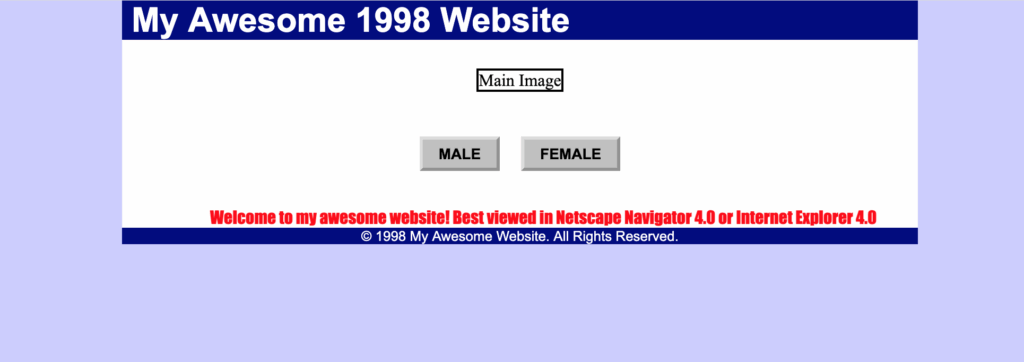
I used V0 to outline the project. I asked it for “give me a flask project that shows an image. Beneath the image is a button for ‘male’ or ‘female’. Put that project in a folder that is called ‘web-app’…” and so forth. I then asked it to provide CSS “like a website from 1998”. Then I asked it for a few Terraform files “to deploy this like it will get ECS Fargate, and make the cheapest possible EFS for storage” and “can you write a JSON object for the IAM permissions that are required to deploy this” etc. I also asked it to remove Javascript from Flask app, simply to see if it could refactor.

Finally, I downloaded the V0 project as a zip file, unzipped it, made several manual changes, and created a git repo. Then, I relied on Cursor afterwards. I asked Cursor what it thought the project was attempting to do, and it gave a correct answer and wrote some documentation. I asked it to create .tf files for a Lambda and a corresponding Lambda file in a specific directory. It did so. The same went with other Docker files, updates to IAM permissions, more .tf files.

Cursor wrote the GitHub workflows. These are flows I read and understand, but have never written myself. I described questions like “I’d like to write a check for the PEP8 standards. It should run on any pull request into main, and refuse the pull request if any Python file fails the PEP8 test.”

The project proceeded from there in Cursor.

Great Results from AI

V0 impressed me. The easy-to-understand interface didn’t only write the correct code, but it also arranged the project’s folder structure in the way I had asked it to. I did this a few other times as well, without prompting it for a folder structure, and it produced results that were sensible and understandable.

The Flask application CSS did change as I asked: it produced a 1998-style website, in all of its nostalgic hideousness. It evoked the early web fascination, like a large image load over a mere 30 seconds! I might have asked it to simulate a 56k dial-up hiss next.

Gemini assisted brainstorming like a subservient, technically astute butler. If I asked a question that I knew would be ‘the wrong’ question (“What is the best machine learning model for image categorization?”), it answered rightly that there is no ‘best option’ and summarized the advantages of some models over others. I advised it that I was concerned about too much memory usage in a single ECS task. It offered me options of training in batches or training in parallel. It provides streams of coding examples for both.

Were the answers from Gemini the best answers, or did it hallucinate? That I can’t answer. Scikit-learn is something I’ve used for less than a year. Still, its answers were fluid, helpful, and offered ideas to investigate further.

Cursor, where I did the bulk of the editing, proved useful in both brainstorming and coding. I checked what it would say if I asked, “Should I store numpy arrays in S3 or EFS? I don’t expect them to be accessed continuously, but I will need to train a model with them. That model will run in ECS.” It replied with what I thought made sense: EFS is much more expensive than S3, and has the advantage of lightly coupling containers from Amazon Services. It could be shared as a common network drive across several ECS tasks. Several prompts followed. Eventually, it recommended S3 due to cost, especially since I also told it I did not plan on training a model across parallel containers.

The writing of novel code also impressed me. When I asked it for a Lambda or a Github workflow, it wrote with certain patterns I did not recognize. I asked it questions like “why did you institute that variable as ‘None’ on line 12?” or “why are the Terraform Plan and Terraform Apply commands separate”? It politely tutored me on best practices, explaining why these design patterns were common. Finally, I was able to update my workflows without any documentation reading. I asked Cursor to disable or reenable runs on pull requests, pushes etc and it modified them correctly.

As my project grew, it did reasonably well at managing IAM permissions, particularly when it came to consolidating and organizing policy documents. More on that later, though.

What Cursor Didn’t do so Well

I love code that is clean and easy to read. PEP8 helps me keep it that way. Cursor had a different opinion on all that. I wrote broad prompts like “re-format this file for pep8 standards” or even “run pycodestyle, and correct any formatting errors.” Neither worked. The latter test surprised me the most. The pycodestyle command is lucidly blunt about what you need to fix. Cursor could never get it done efficiently, and I continue to check PEP8 manually.

Cursor responded to a prompt such as ‘make a reverse proxy in this folder. Make sure it has Docker file. Also, use gunicorn to handle the headers.’ I expected the simplicity I had seen through a Udemy course. What I got was not exactly that, of course, but it was flawed. Cursor placed header information in both the Docker file and the related gunicorn file, which caused errors at deployment.

Another Docker related example was this: I got errors in which a Docker file could not find a related file to import when I deployed it, even though it built fine from a terminal command. Cursor suggested a fix that involved searching several directories up, and performing a recursive search for the apparently absent file. Turns out the error was in my Deploy.yml. I had the docker build command ending in ‘.’ as opposed to the intended ‘..’ -making this a remarkably simple error to identify and fix.

These are only two examples in which Cursor built a Rube Goldberg machine to solve an issue, when best practices call for Occam’s Razor. With these occasional Rube Goldberg solutions, Cursor proved as error-prone as any human. A change in one file to fix one problem caused a break in functionality in another file, causing another problem. I learned to ask Cursor to double-check, sometimes with colorful language.

Cursor proved incredibly time-saving when it came to IAM permissions. It was great at analyzing them and refactoring them as needed. But I did notice a flaw: it didn’t seem to follow least privilege consistently. Frequently, the first suggestion for permissions invoked the dreaded asterisks on resources. Furthermore, it was seldom accurate in predicting all the permissions that would be needed to deploy a resource. Even prompts like “Make sure the resource has read permissions, to the s3 bucket. Apply write permissions to only keys that begin with ‘write-directory'” would miss critical permissions.

Closing thoughts

Did AI make me 10x faster at making this project? At the time of this writing, I’ve put in about 16 hours of work into it, and I estimate it is about 60% complete. It did make things faster, but not to such an astronomical degree. If you’d like me to set up a GeoCities site, with some raw JavaScript, that can be finished before my Napster finishes a download, though.

Will AI turn a technical person into a non-technical person? Qualified, yes, if that non-technical person wants to use AI as a teaching aide, rather than a skill replacement. If you are non-technical person, ready to deploy a cool app to AWS cloud, consider this: when I first learned cloud development, I somehow made a git commit that publicly exposed (non-root) AWS access credentials. Next, I got a surprise $635 dollar bill. Amazon had disabled the compromised IAM user. They forgave the bill, but I still went region by region, resource by resource, to ensure nothing was left running. This is one of hundreds of ways things can go wrong if you don’t know what to ask for.

This leads to another point. AI can give you ideas, recommendations, explanation of trade offs, but it cannot make decisions for you. I chose to deploy this project with Fargate because it was simple (see above, KISS method), but that decision was pretty unconstrained. I’m not considering pre-existing infrastructure, as one would in a professional environment. I am barely considering the cost too. I would under no circumstances trust an AI to tell me “how much will running this project cost?” or “will Fargate be costlier than EKS?” because it likely will hallucinate the math. It would flatter me with “great question!” while doing so.

There is one final thought though. Even though AI did not make this project exponentially faster to deploy, it did make it overall easier. As I debugged and re-deployed, it was nice to have an integrated terminal to ask questions, rather than have four browser tabs open between official documentation, stack overflow, a repo of sample code etc. If I updated or introduced a variable name, I did not have to scour my code for every single reference either. I also grew in skill as I asked it questions about why it structured code a certain way. It answered questions when I didn’t understand a particular error in deployment, a cloud watch log, or even locally.

The explanations have always been fruitful, even if I make mental notes to double check for accuracy.

Thanks for reading, and remember, this is only one developer’s experience!